Drop Shadow on 3 Sides
#shadow-three-sides { -moz-box-shadow: 0px 7px 5px -2px blue, 7px 0px 5px -2px red, -7px 0px 5px -2px green; -webkit-box-shadow: 0px 7px 5px -2px blue, 7px 0px 5px -2px red, -7px 0px 5px -2px green; box-shadow: 0px 7px 5px -2px blue, 7px 0px 5px -2px red, -7px 0px 5px -2px green; } http://blog.grio.com/2012/02/a-quick-reference-on-box-shadows.html
DMS Accordions
Accordions Add to Page To insert into a page or another accordion (to create nested accordions) simply page use the following shortcode: [accordions accordion_set=SetName accordionicon=yes] To find your set name go to Accordions > Accordion Sets and locate the ‘slug’ for your specific accordion. Extra Parameters (optional) accordion_orderby= ID (default), title, date, modified or […]
Paypal Button with Service Charge and Check Boxes
A 3.2% convenience fee will be charged for all online transactions. The minimum payment amount is $250.00. If you would like to pay for your storage unit, click here. Step 1: Enter Property Address: Step 2: Choose Month: Select MonthJanuaryFebruaryMarchAprilMayJuneJulyAugustSeptemberOctoberNovemberDecemberNot Applicable Step 3: Payment are for: Rent Security Deposit Late Fee Utility Bill Solid Waste Fee Last Month’s Rent […]
Power User Plugins
https://managewp.com/wordpress-power-user-plugins
Powerpoint Theme
http://www.uwec.edu/help/PPoint07/theme-m.htm
Plugin – User Role Editor
Plugin – User Role Editor http://wordpress.org/plugins/user-role-editor/ With User Role Editor WordPress plugin you can change user role (except Administrator) capabilities easy, with a few clicks. Just turn on check boxes of capabilities you wish to add to the selected role and click “Update” button to save your changes. That’s done. Add new roles and customize […]
Social Media Sizes
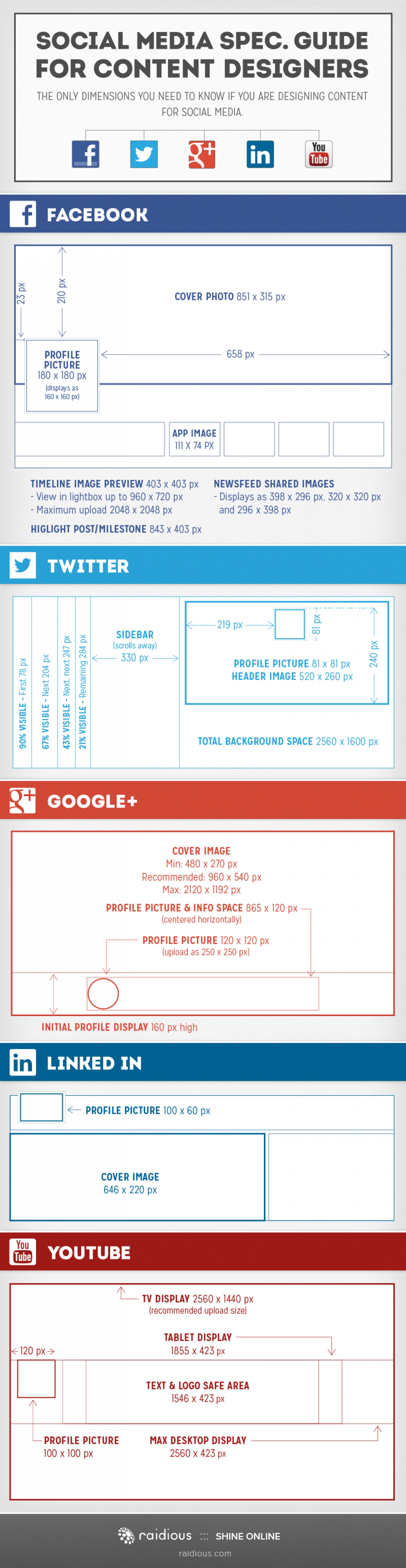
http://visual.ly/social-media-spec-guide New Twitter Size: http://justcreative.com/2014/04/24/twitter-cover-photo-template-april-2014-psd-download/
Other Backup Options for WP
http://torquemag.io/backup-plugins-for-wordpress/ How To Backup WordPress: Guide to Free & Premium Services and Plugins
Network Solution Domain to BlueHost Site
You need to add his domain as an addon domain on your bluehost account. Login to your cpanel (YOURdomain.com/cpanel). At the top of the page, click Domain Manager Click “Assign a domain to your cPanel account.” Under “Use a domain that is not already associated with your account” enter “HISdomain.com.” Bluehost will automatically lookup the […]
Ninja Form Not Saving
Form And Field Settings Do Not Save / Revert To Default Some users will experience problems when trying to save forms that have a large number of fields. Usually this occurs when the field count approaches 60-100 or greater. After this point, fields can be added, but the saving behavior will be very erratic, and […]